
Smart Welcome TV
Your property's own in-room TV
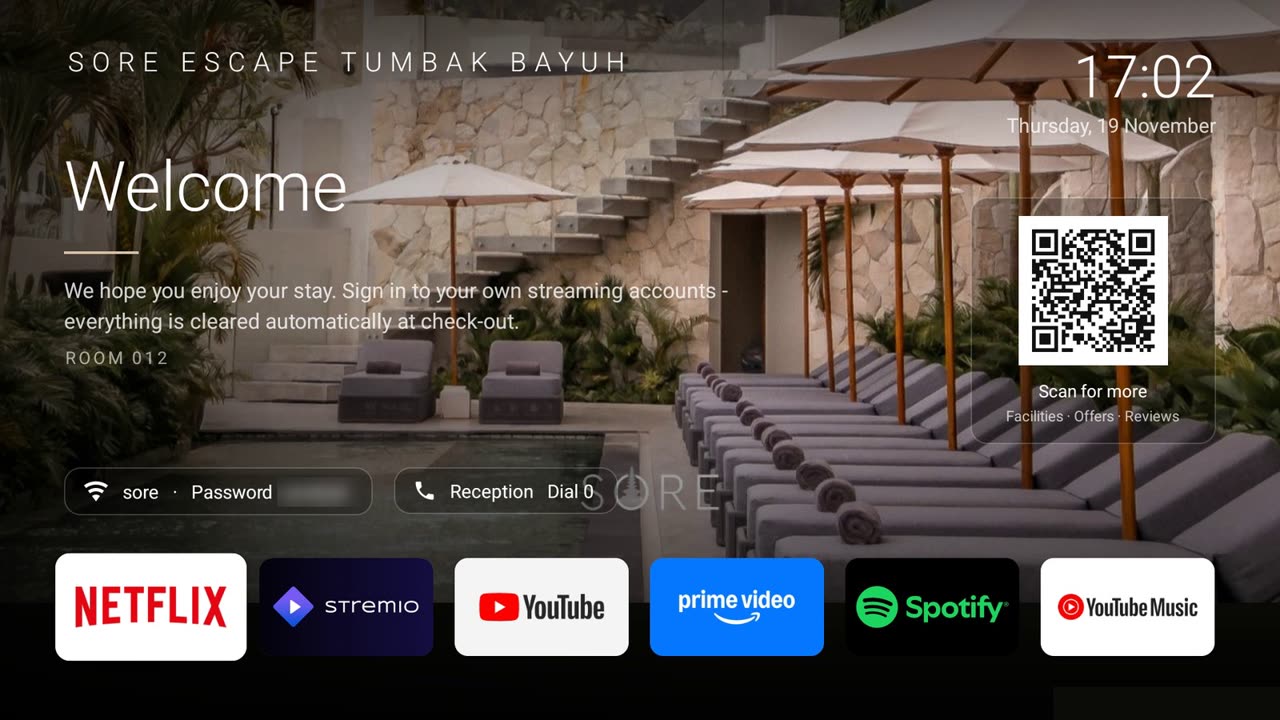
Every TV greets your guest with your photos, logo, Wi-Fi and reception number, with Netflix, YouTube and more one click away. At check-out, every streaming login is erased automatically for the next guest.
For hotels, villas and serviced apartments · Your team runs it from a phone; we handle the technology
Features
What your guests see, and what your team controls
One system for every room. Branding, apps and guest information come from your dashboard, so nothing has to be changed on the TV itself.
Branded welcome screen
Your photos, logo, Wi-Fi and reception number. Guests are greeted by name after check-in.
Privacy at check-out
Netflix, YouTube, Prime Video and Spotify are signed out automatically, so the next guest never sees the last guest's account.
Guest page by QR code
Your offers, facilities, Google reviews and a WhatsApp button, opened from the TV with the guest's phone.
Managed from a phone
Check-in, check-out, restart a TV, update photos or pair a new remote in seconds, from anywhere.
Your apps, your rules
Choose which apps appear and in what order. Other apps and the TV settings stay locked away from guests.
Statistics & staff roles
Watching time per room, most used apps and QR scans. Front desk handles check-in and check-out; managers handle settings.
How it works
A small box behind each TV, a dashboard for your team
Each TV gets a Google TV box set up by us. It needs only the room's normal Wi-Fi: no extra server at your property and no open ports on your network.
Check in from the dashboard
Front desk taps Check-in and types the guest's name. Both TVs in the room show a personal welcome.
Guests use their own accounts
Guests sign in to Netflix or YouTube themselves, or cast from their phone. When the TV is idle, a screensaver shows your property photos.
Check out, everything is cleared
One tap signs out every streaming app and returns the TV to your welcome screen, ready for the next guest.
Short consultation
Number of rooms and TVs, Wi-Fi coverage and which apps you want.
Branding & guest page
We prepare your welcome screen, photos, room list and guest page.
Installation
Boxes are installed and paired to each room, usually within 7–14 days of confirmation.
Training & support
Your staff learn the dashboard in minutes. Software updates are installed automatically on every TV.
Purchase or rental
Two ways to get started
Both options include the software, the dashboard, updates and remote support for a monthly fee per TV. The quotation shows both, calculated for your number of TVs.
Purchase
You buy the boxes once, with a 12-month warranty, then pay a monthly fee per TV. Lower total cost from the second year.
Suitable for: properties that prefer to own the equipment.
Rental, all-in
No upfront payment for the boxes. One monthly fee per TV covers everything, and faulty boxes are replaced during the contract.
Suitable for: properties that want almost no upfront investment.
Included
- Software, server and automatic updates
- Dashboard for your team, on phone and computer
- Automatic sign-out of streaming apps at check-out
- Remote support and remote re-pairing of TV remotes
- Changes to photos, offers and guest page at any time
Not included
- The TVs themselves (any TV with HDMI works)
- Internet connection and Wi-Fi in the rooms
- Netflix or other paid subscriptions (guests use their own)
- Damage caused by guests (drops, water, loss)
Request a Quote
Tell us about your property
A few details are enough for a quotation with both options. The form prepares a WhatsApp message; you review it and tap Send.
Want to see it first? Ask for a demo: we can show the welcome screen with your own property's photos.
Not sure about purchase or rental? Choose "Not sure yet" and both are compared in the quotation.
FAQ
Frequently asked
Does the property need a Netflix account?
No. Providing a shared Netflix account for guests is against Netflix's terms. Guests sign in with their own account or cast from their phone, and everything is signed out automatically at check-out.
Will it work with our existing TVs?
Yes. Any TV with an HDMI port works, because the system runs on a small Google TV box behind the TV. You keep your TVs.
What do we need at the property?
A TV with HDMI in each room and Wi-Fi coverage in the rooms. No local server, no extra network equipment and no open ports.
Can guests change the settings or install apps?
No. Only the apps you choose appear on the home screen. Settings and other apps are locked, so the TV always returns to your welcome screen.
We have several properties. Can one team manage all of them?
Yes. Each property has its own branding, rooms and guest page. An owner or group manager can see every property; front desk staff see only their own.
Why aren't prices shown on this page?
The price per TV depends on the number of TVs and on purchase or rental. A quotation shows both options with exact figures for your property.
What happens if a box or remote breaks?
With rental, faulty boxes are replaced during the contract. Purchased boxes have a 12-month warranty. Remotes can be re-paired remotely, and spare remotes are available.
Contact
Want to see it on your own TV?
Ask for a demo or a quotation. Sanjaya will reply personally.